
Mastering Generative UI in Flutter with A2UI
Generative UI has largely entered the mainstream through chat-based experiences. Tools like ChatGPT and Claude have shown how powerful natural language interaction can be for generating responses, summaries, and even simple interface elements.
However, in real product environments, the prompt-and-response model begins to break down. Users need to explore data, compare information and navigate structured workflows efficiently, something chat alone does not handle well.
At ICS, we explored a different approach: not replacing UI with AI, rather allowing AI to operate through UI.
In one of our Flutter applications, we built a catalog of reusable, production-ready components that an agent can dynamically compose using A2UI. Instead of generating arbitrary screens, the agent works within a controlled system of predefined building blocks, allowing the interface to adapt while remaining consistent and usable.
The result is an interface that isn’t predefined or fully generative, but dynamically composed within a system designed to keep it consistent, usable and grounded.
A Real-World Example: Dynamic Project Dashboards
To understand how this works in practice, consider a project management dashboard. When a user selects Project Overview, the agent generates a layout with metric cards, progress charts, and key insights. When the user asks for a Risk View, the interface reconfigures to show risk heatmaps, blocker boards, and action items.
Both experiences are built from the same catalog of components. The difference lies entirely in how the agent composes them based on user intent.
From Static to Generative Interfaces
Interfaces exist on a spectrum. At one end are static interfaces, where every screen is predefined. These systems are predictable and efficient, but struggle to adapt to changing user needs.
At the other end are open-ended generative interfaces, where AI has full freedom to construct UI dynamically. While flexible, these systems often lack consistency and control, making them difficult to use in production environments.
We found the most effective approach lies in the middle: declarative, constrained interfaces.
In this model, the agent does not generate arbitrary UI. Instead, it composes experiences from a predefined catalog of components using structured messages. This allows the interface to adapt dynamically while maintaining consistency, usability and performance.
Building a Widget Catalog
The catalog is the foundation of an A2UI system. It defines what the agent is allowed to render. In our implementation, we built a catalog of 56 components covering metrics, charts, lists, traceability views and analytics dashboards. Each component is designed as a reusable, production-ready building block that can be composed in different contexts.
Each component is defined as a CatalogItem, which includes a schema describing its inputs, and a widget builder responsible for rendering it. The schema communicates intent to the agent, while the builder connects the component to real application data.
Designing the catalog is not just a technical task. It is a product challenge. Each component must balance flexibility and constraint. If it is too rigid, the agent cannot adapt the interface. If it is too flexible, the result becomes inconsistent or confusing. The most effective components encapsulate clear intent, such as “project health summary” or “risk distribution,” rather than generic visual elements.
This shifts how UI development works. Instead of building fixed screens, developers invest in a system of reusable capabilities. The agent then assembles those capabilities dynamically based on user intent.
How A2UI Works
A2UI is a declarative UI protocol that enables safe, structured UI composition. Rather than generating Flutter code, the agent emits structured JSON messages that reference components from the catalog. The client application receives these messages, validates them and maps them to native widgets.
The flow typically looks like this:
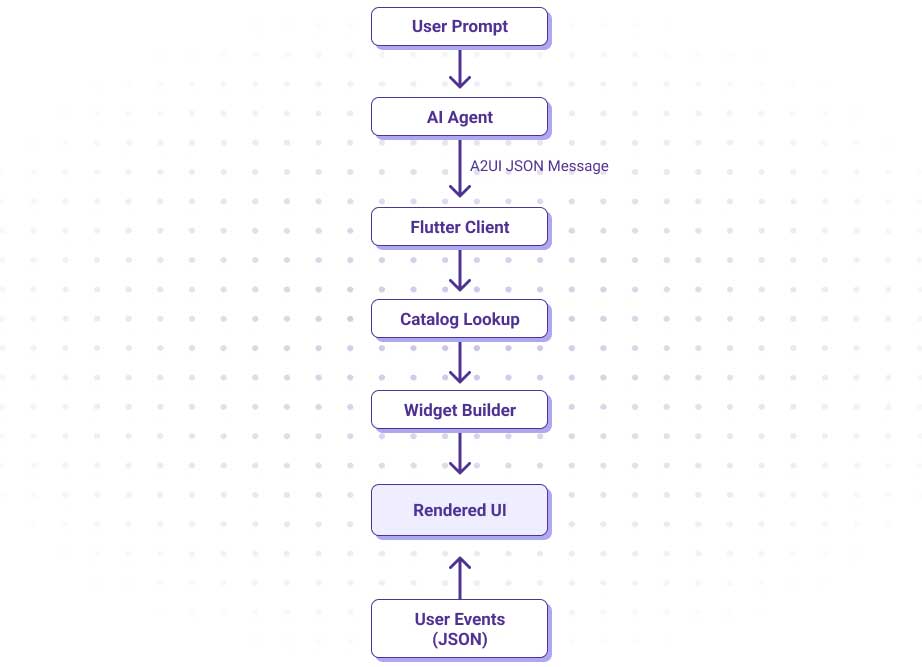
The key idea is that the agent operates strictly within the boundaries of the catalog. It decides what to render, while the application controls how it is rendered.
GenUI: The Flutter SDK
GenUI provides the runtime that connects the agent to the UI. It consists of three core pieces:
GenUiConversation
This manages the interaction with the agent and triggers UI updates.
Catalog
Catalog defines the available components and their schemas.
A2uiMessageProcessor
This validates messages and instantiates widgets.
Because GenUI separates message generation from rendering, it can work with different AI backends while maintaining a consistent UI system.
Why Flutter Fits
Flutter is particularly well suited for agent-driven interfaces because its core model aligns closely with A2UI. Flutter is already built around composable UI units. Every part of the interface is a widget with a defined contract, which maps directly to the concept of catalog components. Converting a widget into a reusable building block becomes a natural extension of how Flutter is designed.
Flutter also provides strong guarantees around rendering. Because layouts are composed declaratively, dynamically generated interfaces can be rendered safely without breaking structure or behavior.
State management further strengthens this model. Using tools like Riverpod, widgets can access live application data directly, allowing the agent to focus on orchestration while the application maintains control over data integrity and side effects.
There are tradeoffs. Unlike web-based systems, Flutter does not rely on CSS for dynamic styling, which limits runtime flexibility. However, this constraint reinforces the importance of a well-designed catalog, where styling and behavior are encapsulated within components. In practice, this results in more predictable, consistent and production-ready interfaces.
Designing Systems, Not Screens
Agent-driven interfaces are not about replacing UI, they are about evolving how it is built. By introducing a structured catalog of components and allowing an agent to compose them dynamically, we reduce the need to design and maintain large numbers of fixed screens. Instead, we define a system of reusable capabilities that can adapt in real time.
This approach introduces new challenges. Behavior becomes less deterministic, and the quality of the experience depends heavily on the design of the catalog. However, in domains where users need to explore data or adapt workflows, the benefits are significant.
What we’ve found is that the real opportunity is not in eliminating UI, but in designing systems that can generate it.
The combination of A2UI and Flutter provides a practical path to bring generative UI into production, delivering interfaces that are not just responsive, but adaptive, while remaining grounded in strong design principles.
If you found this interesting, you may also be interested in this post on building an AI agent.